

Can You Trust Photos in the Age of AI? How to Create More Reliable Property Evidence
Not legal advice. These guides are general information only. Laws vary by state and city and change over time. To get legal advice about your situation, consult a licensed attorney.


Artificial intelligence has made it easier than ever to change an image.
Someone can remove an object, add a mark, change a color, alter lighting, or make a room appear cleaner or more damaged than it was. That creates a serious problem for property documentation: when a photo is used to show the condition of a rental, how can the people reviewing it have confidence that it represents what was actually captured?
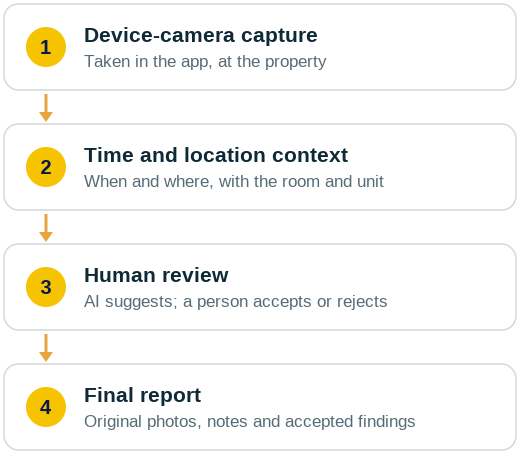
For landlords, property managers, and tenants, the answer is not to trust every image automatically. It is to create a better record of how the image was captured, when it was captured, where it was captured, and how it became part of the final report.
Why ordinary photos can be difficult to verify
A photo saved in a camera roll may not tell the full story. It may be missing:
- The exact time it was captured.
- The location where it was captured.
- Which device or camera created it.
- Whether it was edited after capture.
- Which room or property it belongs to.
- Whether it was taken during the relevant move-in or move-out period.
The image may still be genuine, but the surrounding context is unclear. A property record becomes weaker when the reviewer has to guess where, when, and why an image was created.
AI creates a new documentation risk
AI tools can make realistic modifications look natural. A person reviewing a single image may not notice that it has been changed.
In a rental record, that could create confusion about:
- Whether a stain or scratch was already present.
- Whether an appliance was damaged at move-in or move-out.
- Whether an object was in a room when the walkthrough occurred.
- Whether a room was photographed at the property being discussed.
- Whether a photo belongs to the date claimed by the person sharing it.
This does not mean every edited image is fraudulent. Editing can be useful for ordinary personal or marketing purposes. The important distinction is whether an image is being presented as original evidence of a property’s condition.
The difference between an edited image and a capture record
An image is only one part of trustworthy documentation. A stronger record connects the image to a capture event.
A capture record should help answer:
- What property and room were documented?
- When was the capture made?
- Where was the device when it was captured?
- Was it captured through the device camera or imported from somewhere else?
- What notes or observations were added?
- Was the image included in a move-in or move-out report?
- Can the original capture be preserved for later review?
The more clearly those questions are answered, the less the reviewer has to rely on assumptions.
How ZeusView creates a more reliable property record
ZeusView is designed around guided capture through the device camera. Property photos and video are recorded as part of a property walkthrough rather than simply uploaded from an unrelated photo library.
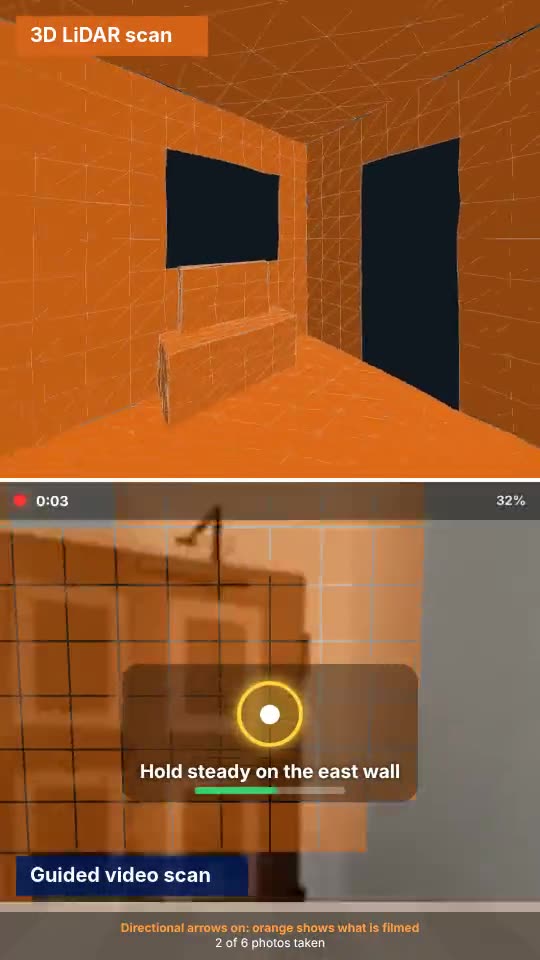
The app records capture context such as:
- The time the image or video was taken.
- The location associated with the capture.
- The device-camera capture event.
- The property and room being documented.
- The move-in or move-out workflow.
- The original visual evidence used to build the report.
This context does not make an image magically unquestionable. It does create a clearer chain between the property, the device, the capture event, and the report.
Location and time add important context
Location and time are especially useful when a record is reviewed later.
If a move-out photo is being used to support a claim about a particular unit, the record should make it easier to understand whether it was captured at the relevant property and during the relevant inspection period.
Time can help organize the sequence of a walkthrough. Location can help connect the capture to the property. Together, they provide context that a detached image file may not provide on its own.
However, metadata should be treated as supporting evidence, not as an absolute guarantee. A trustworthy workflow preserves multiple signals and makes the overall record easier to review.
Device-camera capture versus photo-library uploads
There is an important difference between:
- Capturing a room through the app’s camera workflow.
- Importing an image that already exists somewhere else.
Imported images may be useful in some situations, especially when a landlord is bringing in older records from before using ZeusView. But they should be clearly identified as imported or historical rather than presented as a new ZeusView capture.
For a new move-in or move-out walkthrough, recording through the device camera creates a more consistent process. It reduces uncertainty about whether the image came from the property visit being documented.
Review before AI findings enter the report
AI can assist with comparing move-in and move-out conditions, but it should not be treated as the final decision-maker.
ZeusView is built around a review step. AI may point out a likely change, but the user reviews the finding before it becomes part of the final report.
That distinction matters:
- The original images and video remain the evidence.
- AI provides an assisted observation.
- The user decides whether the observation is relevant.
- The report should distinguish observations from conclusions.
This approach is more trustworthy than allowing an AI-generated result to enter a report without human review.
What a trustworthy property report should show
A useful report should make its evidence easy to understand. Depending on the workflow, it may include:
- Property and unit identifier.
- Move-in or move-out status.
- Capture date and time.
- Location or property association.
- Room or surface being shown.
- Original photos or video references.
- Manual notes.
- AI-assisted observations.
- Accepted or rejected findings.
- Repair or cost details entered by the user.
- A report identifier that connects the report to the saved record.
The goal is not to overwhelm the reader with technical information. The goal is to make the record clear enough that a landlord, tenant, property manager, or reviewer can understand what was captured and how the report was created.
Practical steps for landlords and property managers
To create more reliable records across units:
- Use the same room-by-room walkthrough sequence every time.
- Capture through the app camera for new inspections.
- Keep imported historical photos clearly labeled.
- Record overview images before close-ups.
- Add objective notes about visible conditions.
- Review AI findings before accepting them.
- Preserve original captures rather than keeping only edited exports.
- Limit report access to people who need it.
- Keep move-in and move-out records connected to the same property and unit.
- Follow the lease and applicable local requirements.
Practical steps for tenants
Tenants can improve their own records by:
- Documenting the home before unpacking.
- Recording every room in a consistent order.
- Taking overview images and close-ups of existing conditions.
- Using a camera-based walkthrough instead of relying only on old or forwarded photos.
- Keeping a copy of the report and original captures.
- Reporting visible issues promptly through the required communication channel.
- Documenting the property again after belongings are removed at move-out.
Trust comes from the process
No single photo, timestamp, or AI label should be treated as a complete answer. Trust comes from the combination of:
- A consistent walkthrough.
- Device-camera capture.
- Time and location context.
- Room and property association.
- Preserved original evidence.
- Clear notes.
- Human review of AI observations.
- A report that explains what was captured.
That process makes it harder for an isolated, edited image to be mistaken for a complete property record.
Final takeaway
AI has made photo editing more powerful, but it has also made capture context more important. Property documentation should show more than an image. It should show how the image became part of a record.
ZeusView helps create that record by using guided device-camera capture and preserving useful context such as time, location, property, room, and report history. The result is not a promise that no image can ever be manipulated. It is a more transparent and reviewable process for documenting what was captured and when.
The fair record starts with a trusted capture.
Learn more about ZeusView · Download ZeusView on the App Store · Get ZeusView on Google Play